32 Creative AI Father's Day Poster Prompts
Every Father's Day, many people look for a thoughtful way to say what they feel without repeating the same message. A poster, an image, or a personalized line can be an easy way to show gratitude, hold on to memories, or capture the small moments that often go unspoken.
Now, with AI tools like GPT Image 2.0, creating this kind of poster is much easier. A clear description is enough to generate family scenes, creative styles, or symbolic designs, even if you have no design experience.
In this article, you'll find 30+ ready-to-use Father's Day poster prompts, plus practical tips for making the results look more natural, more polished, and ready to share, print, or customize.
30+ Father's Day Poster Prompts Ready to Copy and Use
Every family celebrates Father's Day differently. Some people want to preserve a special moment, while others are looking for playful designs, creative concepts, or ideas for promotions and school activities. To help you get started, we’ve gathered 32 Father's Day poster prompts you can copy, customize, and try directly in your AI image generator.
Warm and family-oriented Father's Day posters
123Artistic and creative Father's Day posters
234Tribute and emotional Father's Day posters
345Commercial and promotional Father's Day posters
456School Father's Day posters
567How to Create a Father's Day Poster with AI Step by Step
After seeing so many Father's Day poster ideas, you may want to make your own. You can copy these prompts and try them directly in SeaArt AI.
SeaArt AI includes many advanced image generation models, such as GPT Image 2.0, that let you create attractive posters from simple text descriptions in just a few steps and without design experience. Plus, when you sign up, you get free daily energy, enough to test different ideas at no cost.
Step 1. Open the image generator and choose a model
Open the image generator and select the GPT Image 2.0 model. This model stands out for its strong text understanding and its ability to keep compositions clear, which makes it a good fit for creating Father's Day posters with a balanced visual structure.
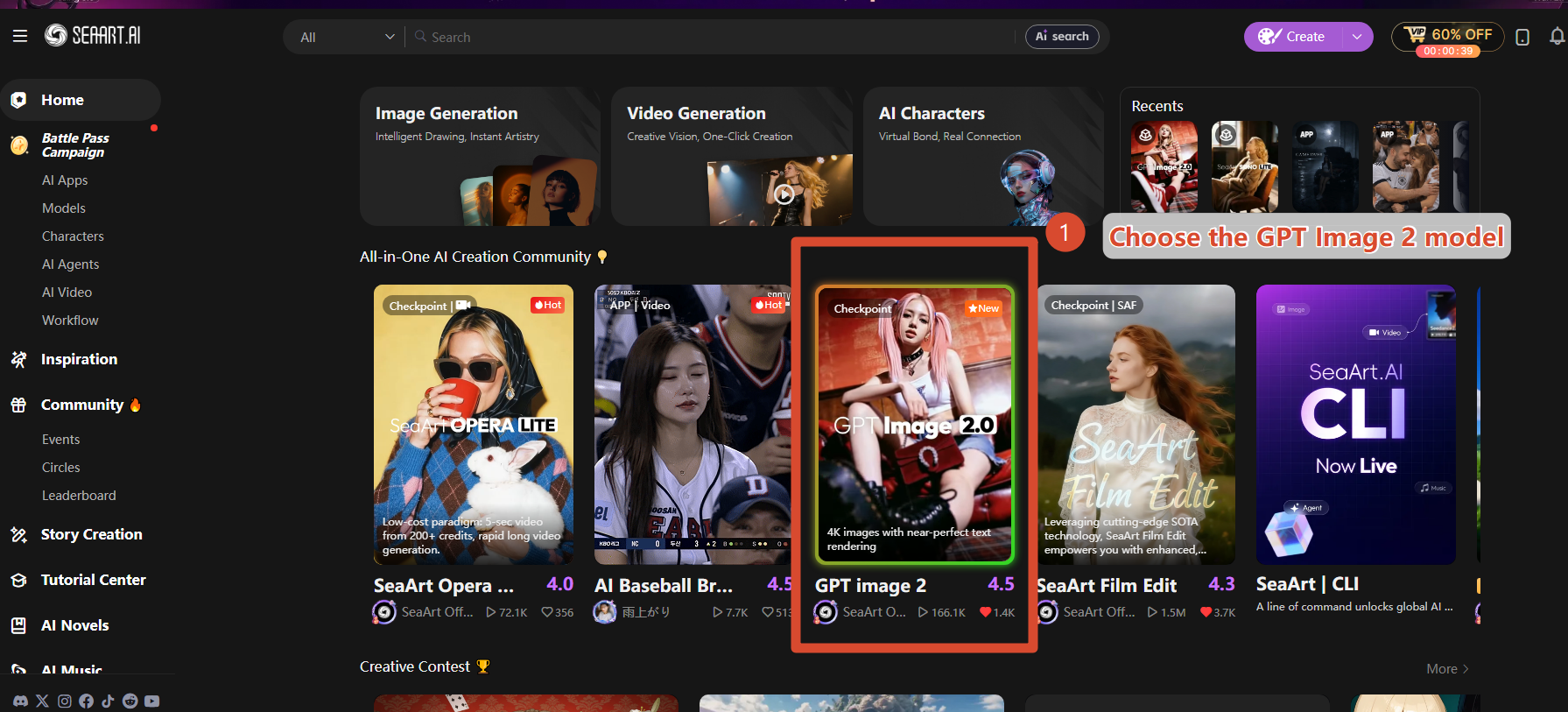
Step 2. Enter your prompt or upload an image
Paste the Father's Day poster prompt you chose into the input field and describe the style, the main element, and the overall mood you want to convey. For example: father-and-son scenes, gifts, coffee, ties, restaurants, or promotional campaigns. If you want a more personalized result, you can also upload a reference image so the AI can generate a design that is closer to what you have in mind.
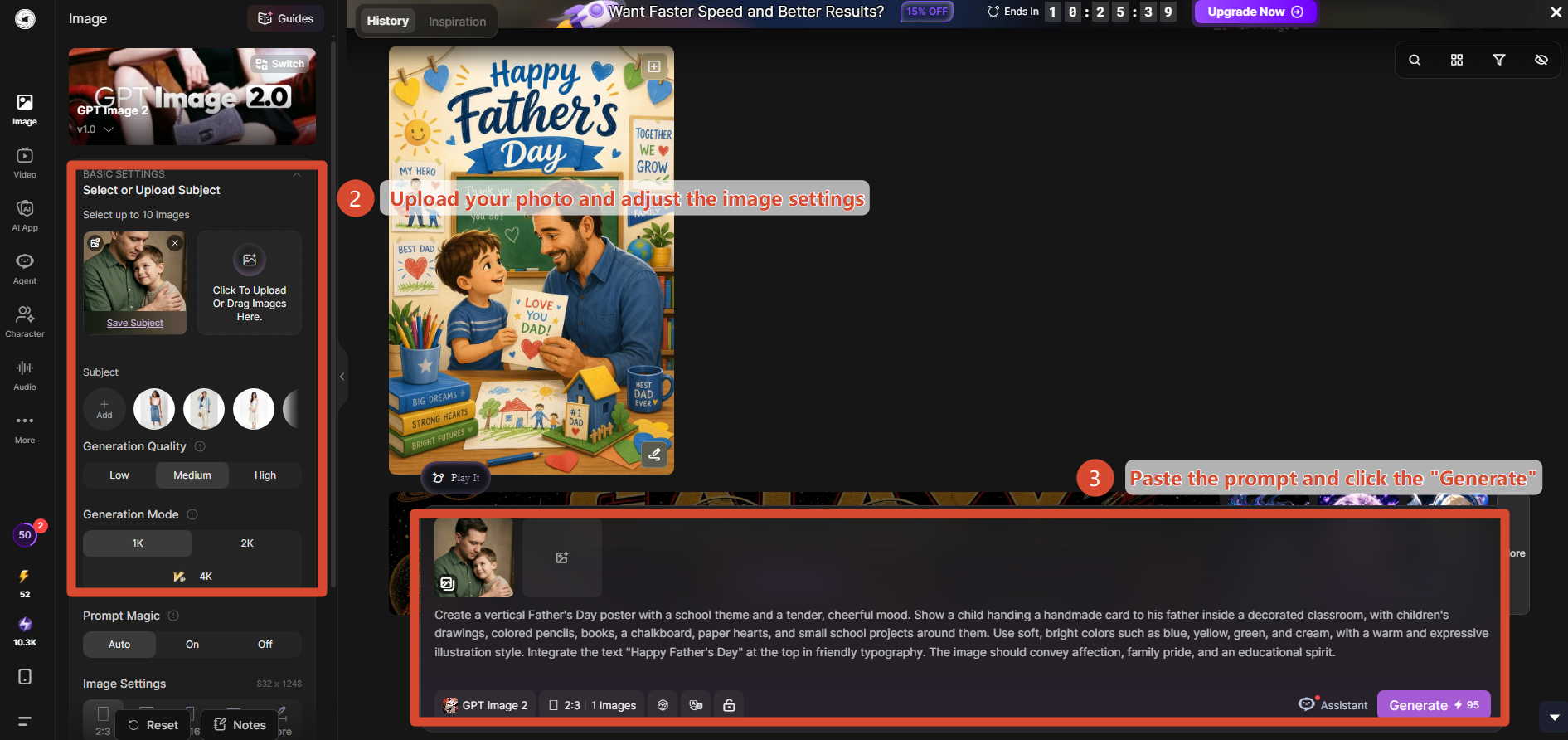
Step 3. Generate and refine the result
Click generate and review the result. If the composition is unclear, there is not enough space for text, or the style is inconsistent, you can keep adjusting the prompt or use the image-to-image feature to refine details without starting over.
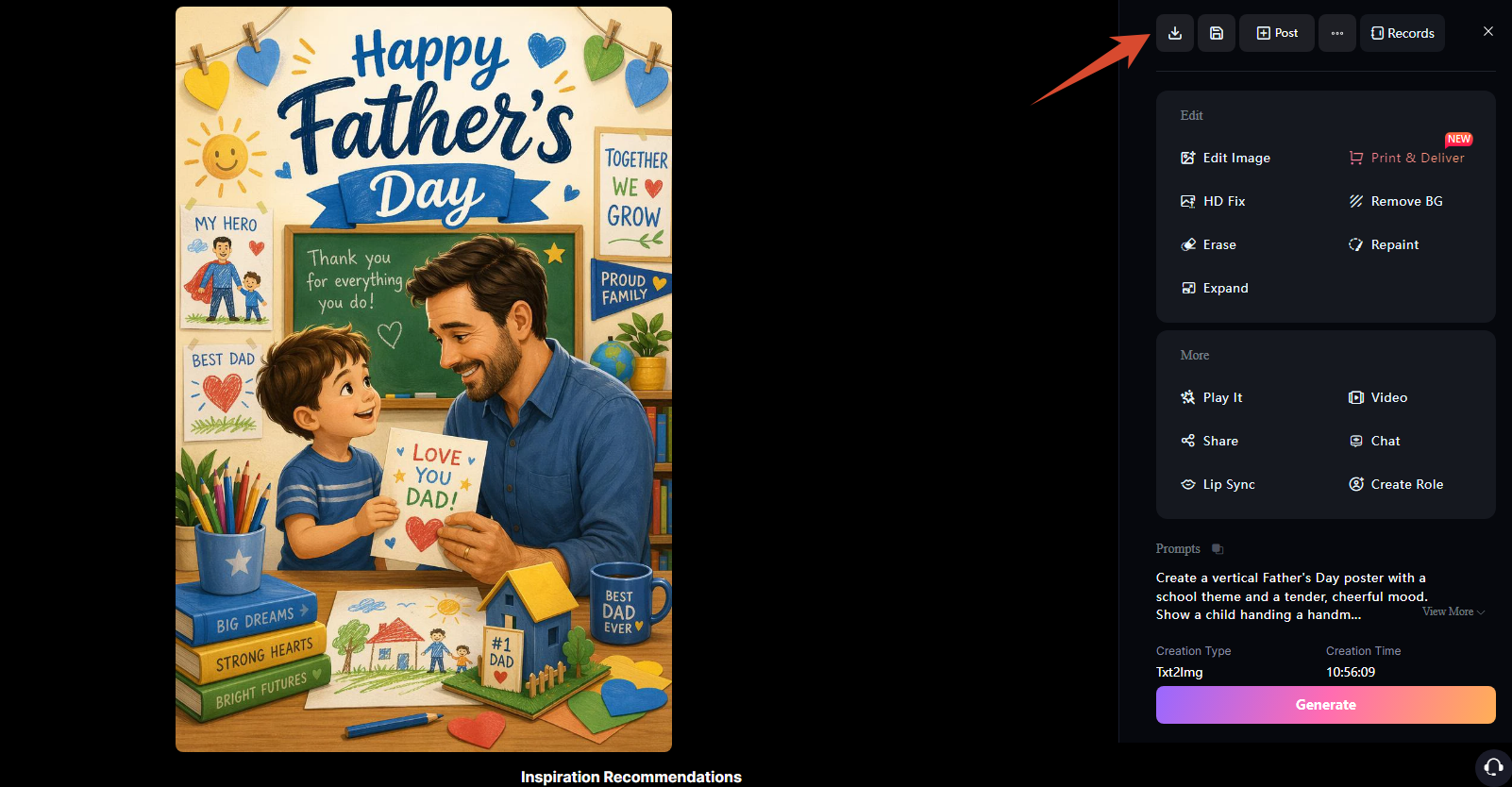
When you're done, download the high-resolution version. Then you can use it as a Father's Day greeting, post it on social media, print it as a poster, or adapt it for seasonal campaigns and promotions.
Practical Tips for Getting the Best Father's Day Posters
When you create Father's Day posters with AI, the creative idea matters, but the small details also play a key role in the final result. The way you write the prompt, the format you choose, and the adjustments you make afterward can all make the poster look clearer, more balanced, and more polished, leading to a stronger finished design.
Write a structured prompt for your Father's Day poster
Often, the difference between an okay poster and one that really says something comes down to how the prompt is built. It is not just about having a general idea. It is about expressing it clearly enough for the AI to understand it well and generate a coherent image.
A practical way to build it is to think through a few key elements first:
- Main subject: who appears in the poster (dad, child, family, and so on)
- Scene: where the action takes place (home, park, cafe, workshop, and so on)
- Visual style: realistic, illustration, watercolor, minimalist, and so on
- Mood: warm, emotional, festive, nostalgic, and so on
- Color palette: warm tones, neutral tones, vintage tones, and so on
- Text in the image: the Father's Day phrase or message
From there, it becomes much easier to build more precise prompts.
For example:
Create a Father's Day poster with [main subject], in [scene], style [visual style], mood [mood], color palette [colors], with space for the text "[message]".
You do not have to follow the same order every time, but you should make sure the key elements are included. The clearer and more complete the description, the more coherent and useful the final result will be.
Define the format before generating the poster
Before generating the design, it is worth thinking about the final format, since it directly affects how the composition is arranged. The same idea can work very differently depending on where it will be used: it does not lay out the same way in a poster, a story, or a web banner.
For Father's Day posters, these are the most common formats:
- Vertical poster (2:3 or 4:5): ideal for posters, vertical posts, or Pinterest
- Square post (1:1): perfect for Instagram or Facebook
- Vertical story (9:16): widely used for Stories or Reels with short messages
- Horizontal banner (16:9): suitable for websites or digital ads
- Commercial flyer (A4 or 5:7): recommended for store or restaurant promotions
If you define the format from the beginning, the AI can better adapt the composition to the final use. That helps you avoid unnecessary cropping and get a more balanced design.
Refine an existing Father's Day poster with Image-to-Image
Sometimes you already have an image that works pretty well, but there are still small details that do not quite fit. This is very common with Father's Day posters: the idea is clear, the emotion is there, but the light, background, or composition may still need adjustment.
Instead of starting from scratch, you can use the Image-to-Image feature to work directly on the same base. From a new prompt, you can adjust only what is needed: warmer lighting, a cleaner background, better-balanced colors, or a clearer composition.
That way, you keep what already works and keep refining the result step by step, until you get a more complete, better-finished poster without losing the essence of the original image.
Frequently Asked Questions About Father's Day Posters
What is a Father's Day poster prompt?
A Father's Day poster prompt is a text description that tells the AI what kind of image you want to create. In it, you can define who appears in the scene, what is happening, what visual style you want, and what mood you want to convey. A clear, well-organized description helps produce more coherent and useful results.
Do I need design experience to create a Father's Day poster with AI?
No. You do not need design experience to create a poster with AI. The most important thing is to explain the idea clearly: what you want to show, what feeling you want to convey, and what elements should appear. With a well-structured prompt, you can get good results even without technical knowledge.
What kind of prompt works best for a Father's Day poster?
Prompts work best when they are well structured and include several key elements in a single description. For example: the main subject, the scene, the visual style, the mood, the color palette, and the space for the text. This kind of structure helps the AI generate posters that are more balanced and visually consistent.
Can these prompts be used for commercial posters?
These prompts can be used for commercial purposes because they are only text descriptions and are not subject to use restrictions. However, the images generated may or may not include commercial rights, depending on the tool and model used. For that reason, it is a good idea to review the platform's terms of use before using them in commercial projects.
Conclusion
A Father's Day poster does not have to be perfect to be meaningful, but it does need a clear idea. It can be a family scene, a fun design, a store promotion, or a more symbolic tribute; the important thing is to know who the poster is for.
Use these Father's Day poster prompts as a starting point and adjust them with real details: a name, a memory, a hobby, a brand, or a phrase that sounds like you. That way, the result stops feeling generic and starts feeling more personal.
Related Articles

30+ Father's Day Card Prompts to Create Personalized Father's Day Cards with AI
70+ Thoughtful Father's Day Card Messages: What to Write in a Card
21 Gemini AI Family Photo Prompt Ideas for Warm, Natural Family Pictures

20 ChatGPT Couple Photo Prompts to Create Romantic AI Images