
How to Make ChatGPT Height Difference AI Art With Your Crush or Favorite Idol
Posts showing height difference AI illustrations made with ChatGPT have been gaining attention on Threads and other social platforms. People are using ChatGPT to turn height differences with a crush, favorite idol, partner, or friend into clean illustrated comparison cards.
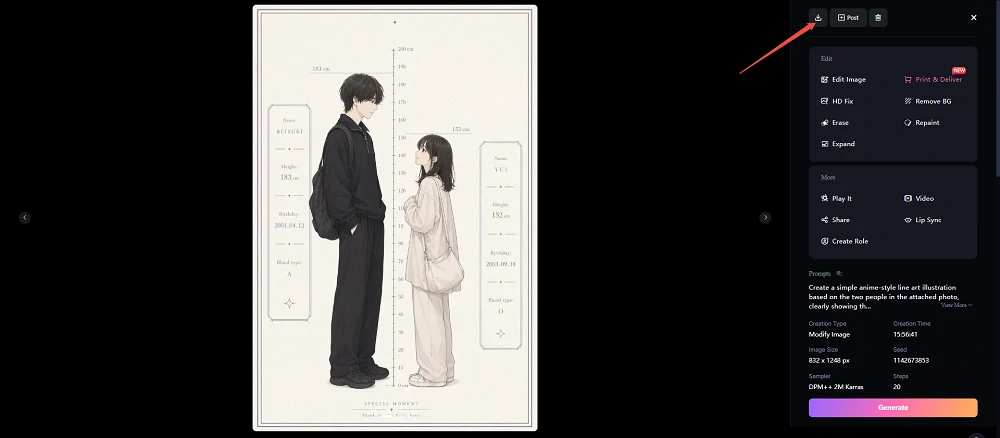
A height difference AI image usually places two people side by side, often with a height scale between them. It makes the difference in height easy to understand at a glance, which is why the format works so well for crush edits, fan posts, couple-style edits, and fun social media content. One of the most popular layouts shows two people standing face to face with a simple height chart in the center. Add names, heights, and a few personality details, and you can create a convincing height difference illustration in minutes.
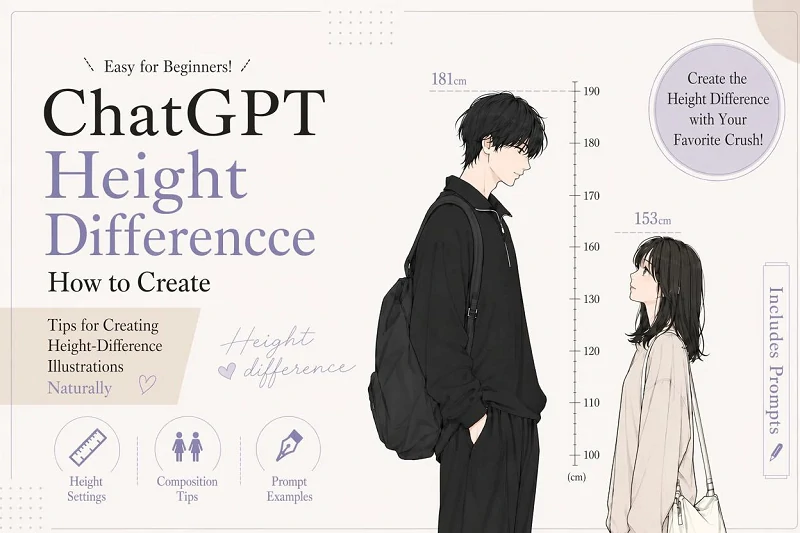
In this guide, you will learn how to make a height difference AI illustration with ChatGPT, how to create one in SeaArt AI when you need more image generations, and what to keep in mind when using personal photos or images of your favorite public figure. You will also find copy-ready prompts you can use for different styles.
How to Make a ChatGPT Height Difference AI Illustration
There are two simple ways to create this type of illustration: upload photos and use a prompt in ChatGPT, or generate the image in SeaArt AI.
You can start with ChatGPT first, then switch to SeaArt AI if you run out of image generations or want to test the same prompt in several different styles. Below are both workflows.
Method 1: Create a Height Difference AI Image With ChatGPT
To make one in ChatGPT, prepare photos of the two people you want to include. You can use one photo where both people appear together, or two separate photos.
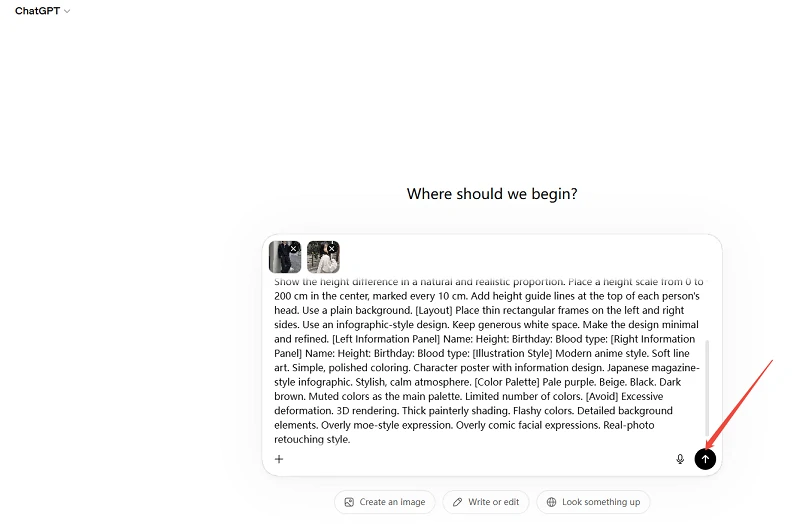
After uploading the photos, paste in the prompt below.
Before generating the image, make sure to edit the left information panel and right information panel. If you leave the name, height, birthday, or blood type blank, the AI may invent placeholder details.
1After the image is generated, check whether the height difference is clear, the text is readable, and the scale is easy to see. If the height difference looks too subtle or the layout feels crowded, reduce the number of text fields, adjust the height values, and generate it again.
Method 2: Create a Height Difference AI Illustration With SeaArt AI
If you do not have enough ChatGPT image generations left, or if you want to test several versions with the same prompt, you can also create the image in SeaArt AI.
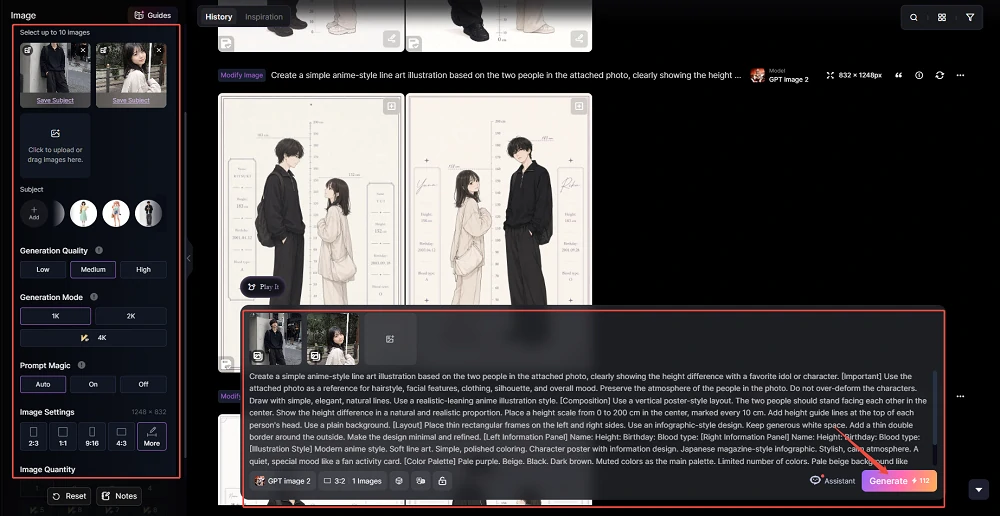
The basic workflow is simple. Choose GPT Image 2.0 as the model, paste in the same prompt, and generate your height difference AI illustration.
Step 1. Go to SeaArt AI and create an account or log in. Once you are signed in, open the image generation page.
- If you want to create the image from photos, upload photos of the two people as reference images.
- If you want to create the image without photos, describe the hairstyles, outfits, mood, and heights clearly in the prompt.
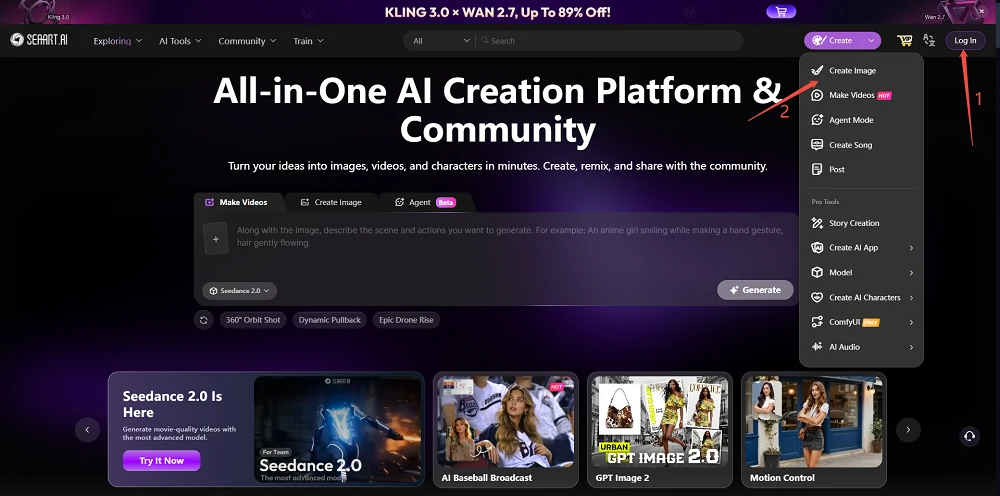
Step 2. Choose the model. For this workflow, select GPT Image 2.0.
Because a height difference AI illustration needs to show two full-body characters and a center height scale, a vertical format usually works best. If you want a layout similar to the reference example, use a vertical 2:3 aspect ratio. This makes it easier to balance the people, height scale, and information panels on both sides.
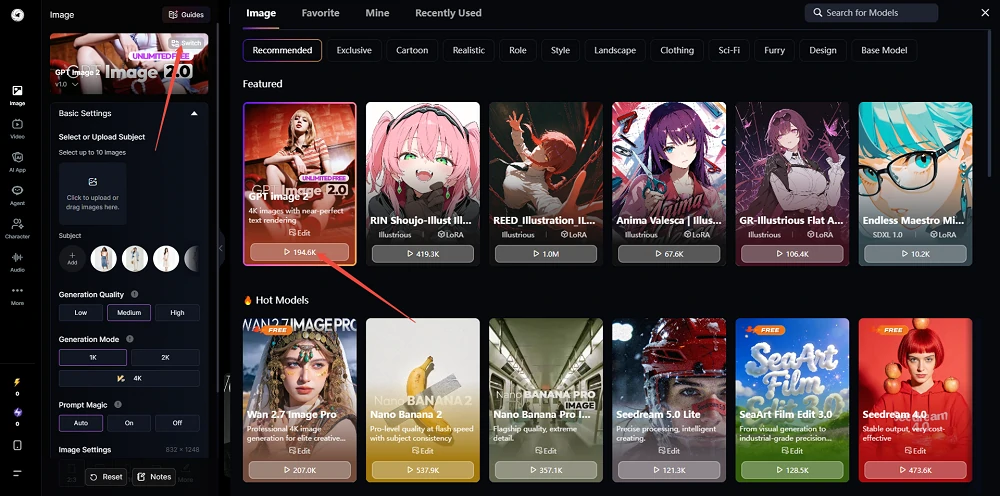
Step 3. After setting the model and image size, paste the same prompt you would use in ChatGPT into the input box. Replace the blank fields for name, height, birthday, blood type, and other details before generating.
2Check the input, then click Create. Generation may take a little time.
Once the illustration is ready, review the height difference, character mood, and text readability. If you like the result, use the download button to save it. SeaArt AI lets you save generated images without a watermark.
Height Difference AI Prompts for Different Uses
Below are copy-ready height difference AI prompts for different use cases.
Choose the prompt closest to the style you want, such as a fan-style height difference card, couple-style illustration, soft magazine layout, or profile card. Paste it into ChatGPT or SeaArt AI, then replace only the names, heights, birthdays, blood types, and other personal fields.
Prompt for a Crush or Favorite Idol
Use this prompt when you want to show the height difference between yourself and a crush or favorite idol. The prompt is designed to create a fictional character inspired by the reference mood, instead of directly recreating a real person.
3Prompt for a Couple-Style Height Difference Image
Use this prompt when you want to show a romantic or paired height difference in a soft, natural way. The key is to keep the two people standing close enough to feel connected, but not so close that the height difference becomes hard to read.
4Prompt for a Soft Magazine-Style Layout
Use this prompt when you want a pale, stylish layout that feels like a magazine profile page. It is a good choice when you want the height difference to be clear while still making the whole image look like a polished character card.
5Prompt for a Profile Card-Style Layout
Use this prompt when you want to include names, heights, birthdays, blood types, and short notes, like a character profile card. It works well when you want to show both the height difference illustration and the profile fields in one clean design.
6Tips for Better Height Difference AI Illustrations
To make the height difference look accurate, include specific heights in centimeters. Instead of saying only "one person is taller," write details such as "182 cm and 157 cm" or "make the 25 cm height difference clearly visible."
It also helps to specify that both people should stand on the same ground line. This makes the height comparison look more natural. If you use photos, choose images where the face, hairstyle, outfit, and overall mood are easy to understand.
Keep the text simple. Names and heights are usually enough for a clean result. A plain or softly colored background also makes the people and height scale easier to read.
What to Know Before Using Photos or Idol Images
If you use personal photos, check that the background does not show private information such as your address, school name, workplace, or car license plate. If you plan to post the image on social media, avoid photos that reveal personal details.
If you use images of a favorite idol, actor, creator, or other public figure, be careful with official photos, paid content, fan club images, and copyrighted materials. Check the usage rules of the image and the platform where you plan to post. Try to enjoy the trend in a way that does not look like unauthorized reposting.
When posting, it is also safer to make it clear that the image is AI-generated. This helps avoid confusion with official photos or real images of the person.
Height Difference AI - FAQ
Can I create a height difference AI image without photos?
Yes. If you do not use photos, include each person's height, hairstyle, outfit, mood, and standing position in the prompt. The result may feel less personally accurate than a photo-based generation, but it can work well as an original character-style height difference illustration.
Can I create a height difference image with my crush or favorite idol?
Yes, but be careful. A reference image can help the AI capture a similar hairstyle, outfit, or mood. However, if you use official photos, paid content, or fan club images, check the terms of use and rights before posting. It is also a good idea to label the result as AI-generated or fan-made.
If I turn the person into a silhouette or invisible figure, does that avoid copyright issues?
Using a silhouette or invisible figure may be safer than directly using a real image, but it does not automatically remove all risks.
If the name, outfit, pose, or composition strongly reminds viewers of a specific person, character, or official image, rights or publicity issues may still apply. When posting, avoid using official images directly and make it clear that the result is AI-generated or fan art.
Conclusion
Height difference AI illustrations are a fun social media trend that lets you visualize the height difference between yourself and a crush, favorite idol, partner, or friend using a clean height chart-style image. With only names, heights, and a few mood details, you can create a shareable illustration for fan posts or personal edits.
If you run out of ChatGPT image generations, you can use the same prompts in SeaArt AI and create more versions. When using personal photos or reference images, pay attention to privacy, image rights, and how the result will be shared.
If you want to try the trend, copy one of the prompts from this guide and create your own height difference AI illustration.
Related Articles
I Tried the Ending Fairy AI Filter: How to Make a K-Pop Idol-Style Photo
25 Gemini Caricature Prompts: Create Free Viral AI Avatars
20 ChatGPT Couple Photo Prompts to Create Romantic AI Images

21 Gemini AI Family Photo Prompt Ideas for Warm, Natural Family Pictures