

Kling 2.6 vs Veo 3.1: Full Comparison for Creators
The AI video landscape has shifted dramatically in late 2025. Two major contenders have released significant updates focusing on the "Holy Grail" of generative video: Native Audio integration and enhanced creative control.
This guide examines Kling 2.6 vs Veo 3.1, highlighting Kling's audio-driven character performance capabilities and Veo's cinematic fidelity paired with powerful Google-native editing workflows.
What Is Kling 2.6?
Kling 2.6 is a next-generation generative video model featuring true "Native Audio," allowing it to produce high-quality visuals, natural voiceovers, sound effects, and ambient atmosphere simultaneously in a single pass. It delivers precise audio-visual coordination, ensuring lip movements, actions, and sound remain perfectly synchronized. With full audio control - including dialogue, singing, rap, and custom sound effects - it creates immersive, performance-driven scenes. Its streamlined workflow also makes it highly accessible, enabling users to generate polished, cinematic videos from simple text or image inputs without any complex post-production editing.
What does Veo 3.1 do?
Veo 3.1 is Google's latest AI video-generation model designed to create highly realistic, cinematic videos from text prompts, images, or defined frames. It offers stronger prompt adherence, richer native audio, and improved character consistency. Through Flow, users can combine reference images, generate transitions from first-to-last frames, extend scenes into longer shots, and edit videos with tools like Insert or Remove. Veo 3.1 delivers enhanced lighting, textures, motion quality, and full audio integration across all features, giving creators more narrative and artistic control.
Kling 2.6 vs Veo 3.1: Key Features
In the sections below, we break down these differences with clear comparisons - helping you see where each model excels, where they diverge, and which one best fits your creative style. Dive in to explore how Kling's audio-driven performance engine stacks up against Veo's cinematic, editor-focused ecosystem.
| Feature | Kling AI Video 2.6 | Google Veo 3.1 |
|---|---|---|
| Core Strength | Character Performance & Lip-Sync | Cinematic Fidelity & Editing Workflows |
| Audio | Native Audio: Full lip-sync, singing, rap, dialogue, and sfx generated in one pass. | Integrated Audio: Ambient, music, and basic dialogue; now supports audio in Image-to-Video. |
| Max Duration | 5s or 10s | Up to 8 seconds (approx.) |
| Resolution/FPS | 1080p | 1080p / 24 fps |
| Control Methods | Text Prompts, Image-to-Video, Multi-character tags. | Text, “Ingredients” (Style/Object ref), Start/End Frames, In-painting (Flow). |
| Key Unique Feature | Singing/Rap Mode: Can generate specific vocal performances. | Frames-to-Video: Define the exact start and end point for seamless transitions. |
| Availability | Web Platform & Mobile App | Gemini API, Vertex AI, and Google Flow. |
1. Audio Capabilities: The "Native Audio" Revolution
Both models have moved beyond "silent films," but they approach audio differently.
🌟 Kling AI 2.6: The Performance Artist
Kling 2.6 markets itself on "See the sound, hear the visual." It treats audio as a primary driver of the video generation.
- Complex Lip-Sync: Excels at solo monologues and multi-character dialogue, ensuring lip movements match perfectly.
- Musical Performance: Dedicated modes for Singing and Rap (e.g., "Intense Boom Bap" or "Opera").
- Sonic Variety: Supports ambient sounds (ASMR) and object interactions.
🌟 Google Veo 3.1: The Atmospheric Composer
Veo 3.1 has introduced audio to its "Ingredients," "Frames," and "Extend" features.
- Integrated Generation: Generates ambient sounds, music, and basic dialogue automatically.
- Synchronization: Best for "basic dialogue"; less focus on complex character performance compared to Kling AI Video Generator.
- Workflow: Audio is part of the editing suite in Flow, allowing generation during extension or bridging.
🏆 Winner:
👉️ Character dialogue & musical performance: Kling 2.6
👉️ Atmospheric/ambient sound: Tie
2. Creative Control & Workflow
🌟 Kling AI 2.6: The Prompt Engineer's Dream
Kling relies on a structured prompting formula and parameter toggles.
- Structured Prompts: Uses formula: Scene + Element + Movement + Audio + Style.
- Multi-Character Tagging: Specific tagging logic (e.g., [Character A, angry]: "Text") for complex scenes.
- Simplicity: Straightforward "Text/Image-to-Video" interface.
🌟 Google Veo 3.1: The Editor's Toolbox (via Flow)
Veo 3.1 shines inside Google's Flow tool, offering granular control.
- Ingredients-to-Video: Upload multiple reference images (style, characters) to guide generation.
- Frames-to-Video: Provide first AND last frame for Veo to generate the bridge. Perfect for transitions.
- In-Painting: "Insert" objects or "Remove" unwanted elements seamlessly.
🏆 Winner:
👉️ Granular editing and visual control: Veo 3.1
👉️ Script-driven narrative control: Kling 2.6

3. Visual Quality & Consistency
🌟 Kling AI 2.6
- Visuals: Produces highly "immersive" content, focusing on matching camera rhythm to audio.
- Quality: Supports up to 1080p. "Image-to-Audio-Visual" mode quality depends on input resolution.
🌟 Google Veo 3.1
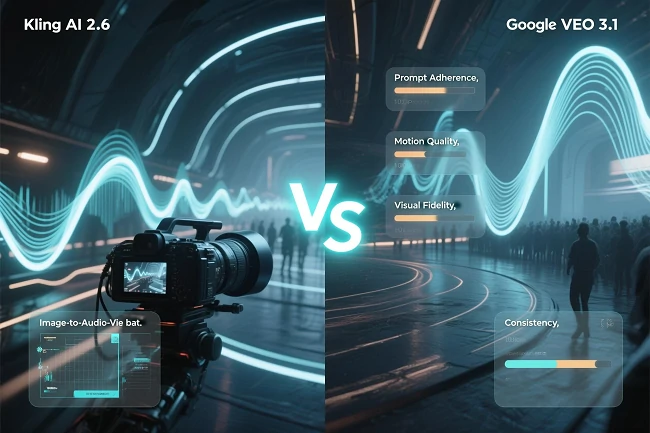
- Prompt Adherence (7.8/10): Very high; understands complex instructions well.
- Motion Quality (7.4/10): Fluid and realistic, though struggles with complex physics in long shots.
- Visual Fidelity (7.1/10): Excellent lighting/texture, but can suffer from "AI Sheen" artifacts.
- Consistency: Great temporal consistency, but wide shots/crowds can cause "micro-instability."
⚖️ Verdict: Both are top-tier (1080p). Veo 3.1 is noted for "cinematic" lighting and adherence. Kling focuses on audio-visual rhythm synchronization.
4. Pricing & Accessibility
This table compares the pricing models and accessibility of Kling AI 2.6 versus Google Veo 3.1.
| Feature | Kling AI 2.6 | Google Veo 3.1 |
|---|---|---|
| Model | Credit-based subscription | Integrated into Google ecosystem. |
| Cost | High-quality Native Audio is expensive (e.g., 35 credits for 5s) | Tied to API usage or Google Workspace subscriptions |
| Access | Open to public via web and app. | Google Pro users, Gemini API (Developers), Vertex AI (Enterprise) |
It highlights a key distinction: Kling AI offers broader public access through a direct-to-consumer credit-based subscription, whereas Google Veo is designed primarily for professional and enterprise use, deeply integrated into the Google ecosystem and API services.
👉️ If individual users want to use Veo 3 efficiently and cost-effectively, please read the guide: How to Use Veo 3.1: Create Cinematic AI Video Generation
Veo 3.1 vs Kling 2.6: Which One Should You Use?
Choosing between Kling AI 2.6 and Google Veo 3.1 depends heavily on your creative style and production needs. Each model offers distinct strengths - Kling excels in performance-driven, audio-synchronized content, while Veo provides cinematic control and advanced editing flexibility.
✅ Choose Kling AI 2.6 If:
- You are a Content Creator/Vlogger: Need talking heads or reviews where characters speak clearly.
- You want to make Music Videos: Unique "Singing" and "Rap" modes allow for creative musical outputs.
- You prefer simple Prompt-to-Video: Type a script and get a video without managing frames.
✅ Choose Google Veo 3.1 If:
- You are a Filmmaker/Editor: "Frames-to-Video" and "Extend" features allow precise storytelling.
- You need precise Visual Control: Need to insert objects or remove distractions (In-painting).
- You are a Developer/Enterprise: Need to build video generation into apps via Gemini API.
- You prioritize Cinematic Lighting: Want footage that looks shot with high-end lenses.
👉️ For more comparison guides on Kling 2.6 and other video creation models, please read: Kling 2.6 vs Kling 2.5 Turbo Review: Performance & Value Compared
How to Use Kling 2.6 on SeaArt AI
Now, the all-in-one creative platform SeaArt AI fully supports the Kling 2.6 model, making top-tier video creation easily accessible.
Step 1: Visit SeaArt AI and open the Kling 2.6 Video Generator.
Step 2: Enter the prompt describing the video you want to generate, upload the image you'd like to base your creation on, and click Generate to start.
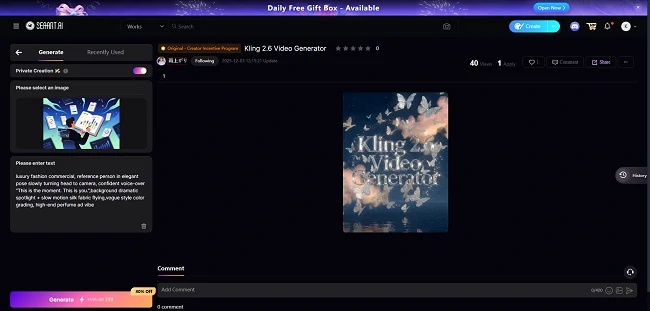
Step 3: After a while, you'll receive a high-quality video that you can download for use or sharing. You can also refine your prompt or upload a new image to generate an even more satisfying result.
Conclusion
Kling 2.6 vs Veo 3.1 offers two powerful but fundamentally different paths for creators, and this guide has broken down their strengths across audio capability, creative control, visual fidelity, pricing, and ideal use cases. Kling 2.6 stands out with its performance-driven Native Audio engine, delivering unmatched lip-sync, singing, and expressive character output, while Veo 3.1 shines in cinematic lighting, precise frame control, and its deeply integrated Google editing workflows.
Whether you prioritize expressive storytelling or high-end cinematic composition, understanding these differences helps you choose the model that aligns with your creative style. And when you're ready to try Kling 2.6 yourself, SeaArt AI now makes it effortless to generate high-quality audio-visual videos with just a prompt and an image.
Related Articles
Kling O1 vs Veo 3.1: Which AI Video Generator is Better?
Flux 1 vs Flux 2: The Detailed Upgrade Guide for Creators
Gemini 3 vs ChatGPT: Features, Pricing & How to Choose
Sora 2 vs Veo 3.1: AI Video Tools Compared for Creators